> For the complete documentation index, see [llms.txt](https://docs.warpstream.com/warpstream/llms.txt). Markdown versions of documentation pages are available by appending `.md` to page URLs; this page is available as [Markdown](https://docs.warpstream.com/warpstream/overview/architecture/life-of-a-request.md).
# Life of a Request (Simplified)
This page explains the flow for a Kafka Produce or Fetch request from client to WarpStream Agent to WarpStream Cloud and back again.
### Produce
Before we can `Produce` to a topic, our client calls the `Metadata` Kafka API on our behalf. This API returns the leader broker for each topic-partition. Because any Agent can handle any Produce or Metadata request, each client can have a different view of which Agent is acting as leader broker for every topic-partition.
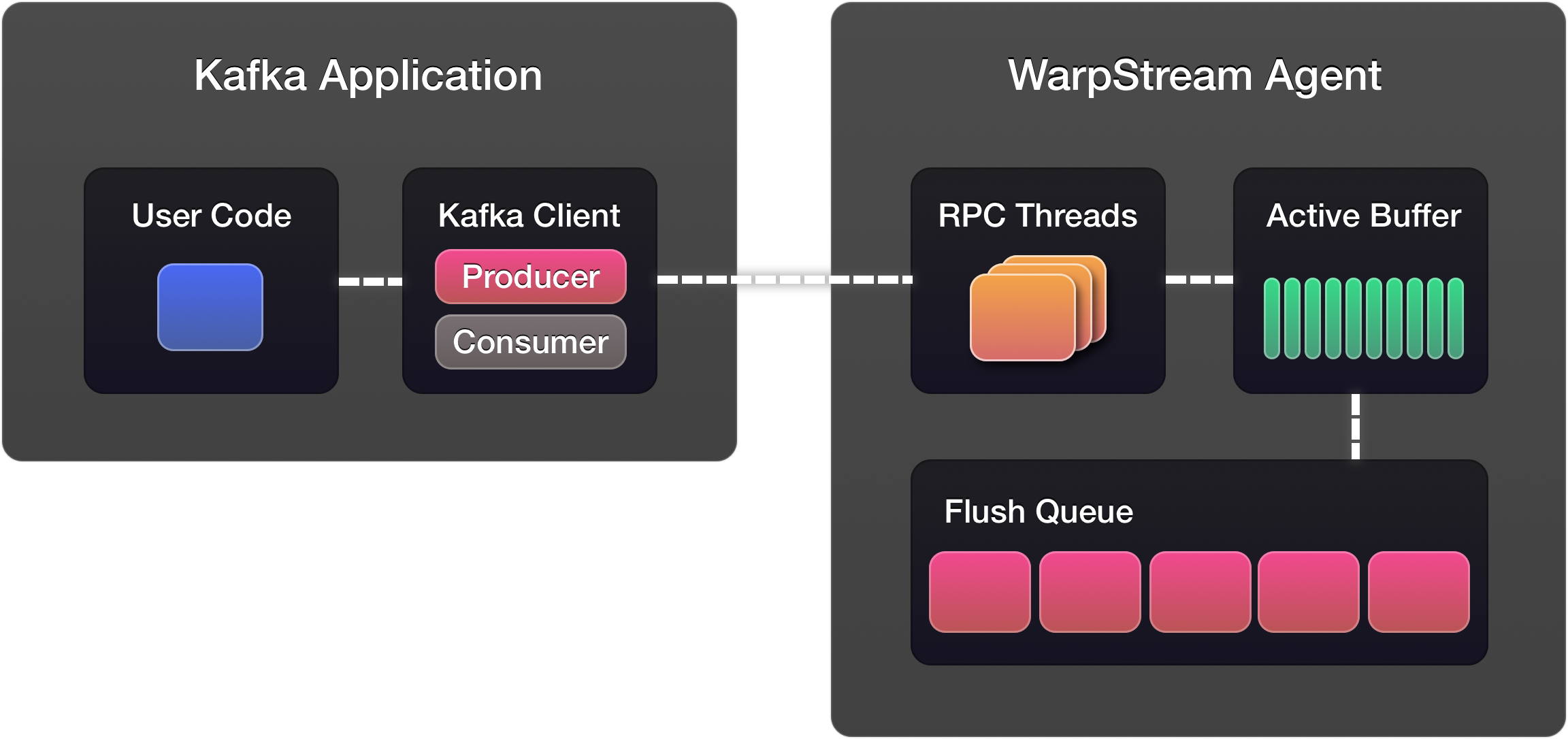
After discovering who the leader is for our desired topics (which, in WarpStream's case, is an arbitrary agent in the same AZ), our client can begin producing records. Because we only return a single leader for every topic-partition in the cluster, every Produce request can contain messages for every topic-partition our client writes to. Let's assume that our client only writes to a single topic for now to make things easier to understand.
WarpStream Produce requests arrive on an arbitrary Agent and are batched together with other `Produce` requests from other clients happening concurrently. Once the Agent's batching interval has elapsed, or the Active Buffer is full, the Active Buffer is serialized to WarpStream's file format and passed to the Flush Queue to be written to object storage.
Once the file is flushed to object storage, the metadata for that file is sent to the WarpStream Cloud and routed to the Virtual Cluster hosting that topic and the other topics that have data contained within that file.
The Virtual Cluster assigns offsets to every batch of records and returns those back to the Agent, which then fans out responses back to waiting clients. The client that issued the `Produce` request will not receive an acknowledgement from the Agent until this entire sequence has completed and the data has been durably persisted in object storage and committed to WarpStream Cloud. WarpStream Agents *never* acknowledge data until it has been durably persisted.
### Fetch
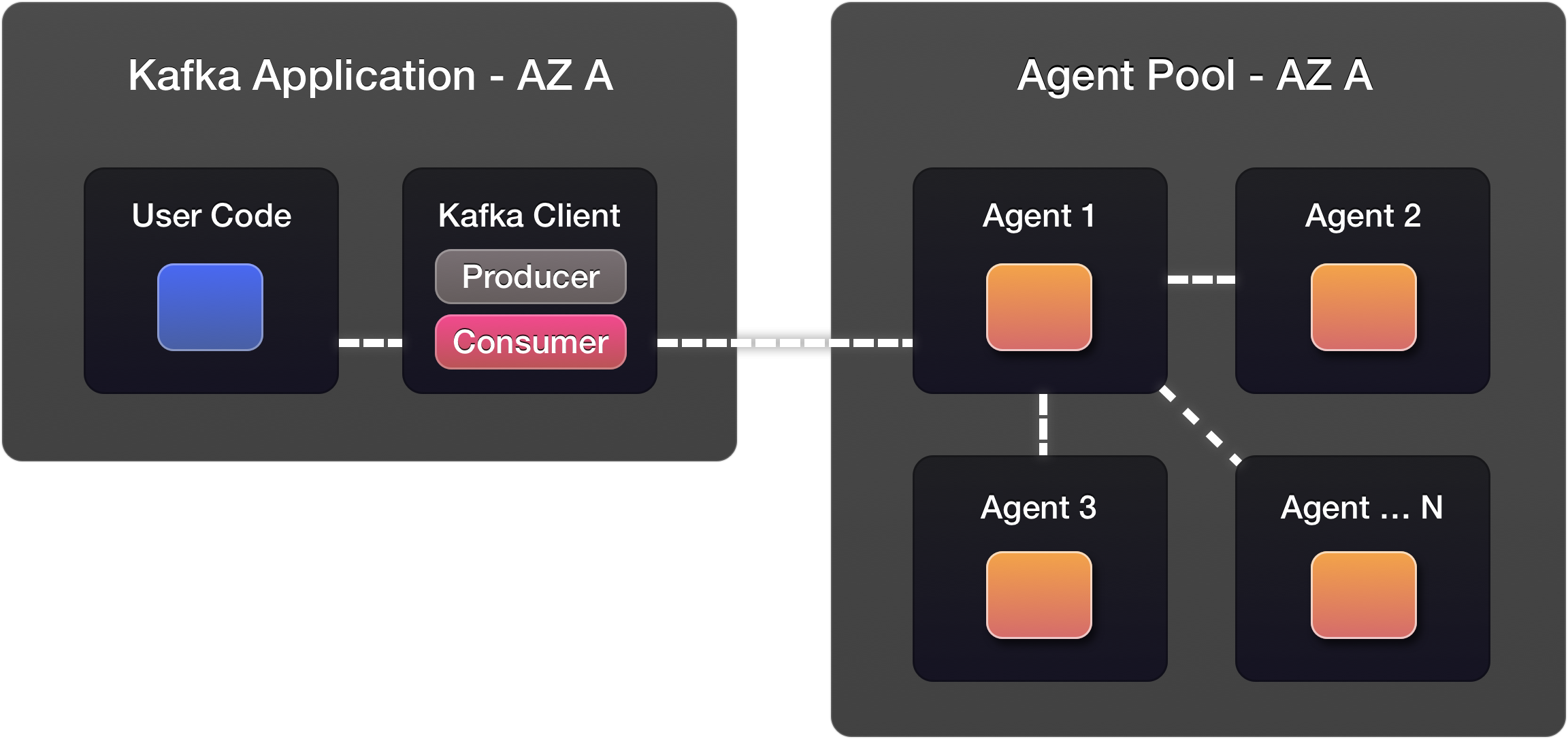
`Fetch`, similar to `Produce`, depends on previously calling the `Metadata` to discover the topic-partition leaders. Calling WarpStream's bootstrap URL will direct your client to an Agent in your availability zone to serve your `Fetch` request.
Let's assume for simplicity that your client is only reading a single topic-partition. Your request will be processed by some Agent, and that Agent will send a command to the WarpStream Cloud that eventually will be processed by your Virtual Cluster. This command instructs your Virtual Cluster to return the set of files that contain data starting with the offset in your `Fetch` request at that moment in time.
Once the Agent processing your `Fetch` has the "pointers" to the set of files containing the data you're going to read, it fans out IO requests to other Agents in the same AZ. All the Agents in each AZ participate in a zone-aware distributed file caching layer to reduce the number of object storage GET requests for the most recent set of files.
The Agent can respond to your `Fetch` request and begin sending the bytes back over the wire once all the "pointers" for the offset you've requested have been read from the distributed file cache.
---
# Agent Instructions
This documentation is published with GitBook. GitBook is the documentation platform designed so that both humans and AI agents can read, navigate, and reason over technical content effectively. Learn more at gitbook.com.
## Querying This Documentation
If you need additional information that is not directly available in this page, you can query the documentation by asking a question.
Perform an HTTP GET request on the following URL with the `ask` and `goal` query parameters:
```
GET https://docs.warpstream.com/warpstream/overview/architecture/life-of-a-request.md?ask=&goal=
```
`ask` is the immediate question: it should be specific, self-contained, and written in natural language.
`goal` is what the user is ultimately trying to achieve, the reason they need the answer. Sharing it helps GitBook give you a better, more relevant answer. A goal is most helpful when it describes the outcome the user wants rather than restating the question. For example, with `ask=how do I create an API token`, a goal like `automate deployments from our CI pipeline` lets GitBook tailor the answer to that use case.
The response will contain a direct answer to the question and relevant excerpts and sources from the documentation.
Use this mechanism when the answer is not explicitly present in the current page, you need clarification or additional context, or you want to retrieve related documentation sections.