Reducing Infrastructure Costs

How to reduce infrastructure costs for WarpStream BYOC clusters.

Reducing Infrastructure Costs

WarpStream infrastructure costs can originate from four different sources:

  1. Networking

  2. Storage

  3. Compute

  4. Object Storage API Fees

Networking

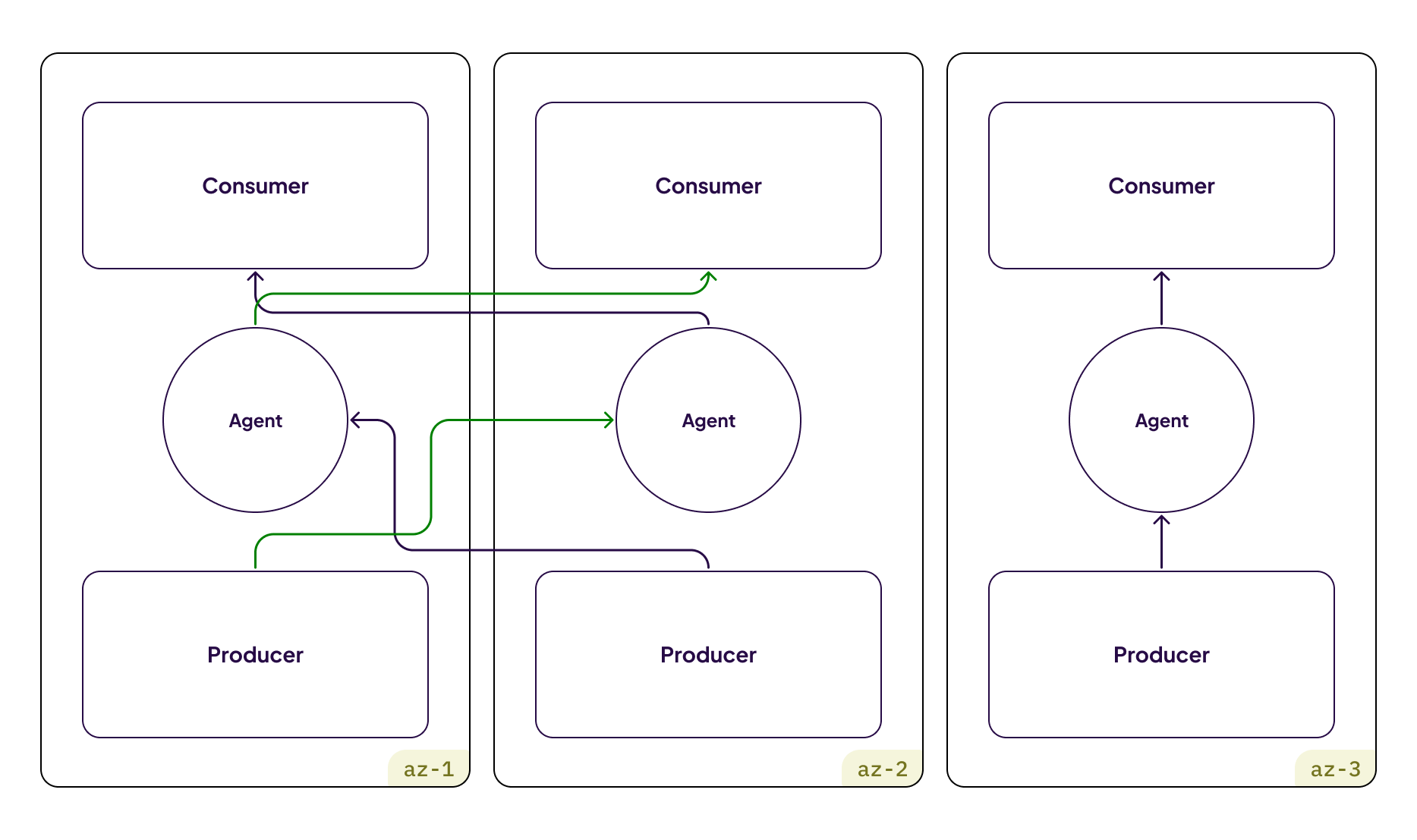
With WarpStream, you can avoid 100% of inter-AZ networking fees by properly configuring your Kafka clients.

Unlike Apache Kafka, WarpStream Agents will never manually replicate data across availability zones, but Kafka producer/consumer clients can still connect cross-zone, resulting in inter-zone networking fees.

Kafka producer/consumer clients incurring inter-zone networking fees.

This happens because by default WarpStream has no way of knowing which availability zone the client is connecting from. To avoid this issue, configure your Kafka clients to announce what availability zone they're running in using a client ID feature, and WarpStream will take care of zonally aligning your Kafka clients (for both Produce and Fetch requests) resulting in almost zero inter-zone networking fees.

Kafka producer/consumer clients using WarpStream's zonal-alignment functionality to eliminate inter-zone networking fees entirely.

Storage

WarpStream uses object storage as the primary and only storage in the system. As a result, storage costs in WarpStream tend to be more than an order of magnitude lowerarrow-up-right in WarpStream than they are in Apache Kafka. Storage costs can be reduced even further by configuring the WarpStream Agents to store data compressed using ZSTD instead of LZ4. Check out our compression documentation for more details.

In addition, just like with Apache Kafka, storage costs can be reduced by reducing the retention of your largest topics as well.

Compute

The easiest way to reduce WarpStream Agent compute costs is to auto-scale the Agents based on CPU usage. This feature is built-in to our Helm Chart for Kubernetesarrow-up-right.

Object Storage API Fees

WarpStream's entire storage engine is designed around minimizing object storage API fees as much as possible. This is accomplished with a file format that can store data for many different topic-partitions, as well as heavy usage of buffering, batching, and caching in the Agents.

The most expensive source of object storage API fees in WarpStream are the PUT requests required to create files as a result of Produce requests. By default, the WarpStream Agents will buffer data in-memory until one of the following two events occur:

  • The batch timeout elapses

  • The Agent estimates that the file it will create with the accumulated data reaches a certain size

at which point the Agent will flush a file to the object store and then acknowledge the Produce request as a success back to the client.

Batch timeout

The default value for the batch timeout in the agent is 250ms. It can be changed with the -batchTimeout Agent flag or the WARPSTREAM_BATCH_TIMEOUT environment variable.

If you decrease this to 100ms for example, you will force a file to be created every 100ms even if it is small, increasing the number of Object Storage PUTs the Agent makes, but lowering latency.

If you increase it to 400ms for example, you will allow more data to accumulate, but probably increase the Produce latency.

Batch size

There are two different ways to control the batch size the Agent uses. You can tune either the compressed or the uncompressed batch size.

The Agent is configured by default with a maximum compressed batch size of 1MiB and a maximum uncompressed batch size of 64MiB.

This means that, by default, the files the Agent creates will be less than 1MiB compressed. The 64MiB is mostly a safeguard, it's hard to write 64MiB of uncompressed data in 1MiB (your compression needs to be very high).

circle-exclamation

That being said, you can override them.

  1. If you want to control the size in terms of uncompressed bytes then change the -batchMaxSizeBytes flag or the WARPSTREAM_BATCH_MAX_SIZE_BYTES environment variable. This disables the default compressed batch size.

  2. If you want to control the size in terms of compressed bytes then change the -batchMaxCompressedSizeBytes flag or the WARPSTREAM_BATCH_MAX_COMPRESSED_SIZE_BYTES .

  3. Optionally, you can also set both flags and the Agent will create a file whenever the file goes above any of the two limits.

circle-info

Note that -batchMaxCompressedSizeBytes is only enforced approximatively: the Agent does not know exactly how big a file is going to be before it actually writes it.

Choosing the batch size to minimize costs

Follow this guide to tune when the Agent creates files:

  1. First, understand what parameter causes files to be created. Graph the sum of the warpstream_agent_segment_batcher_flush_outcome metric grouped by flush_cause. This will tell you if most of the time the Agent creates a new file because of the timeout (e.g. the batch timeout was reached) or because it was buffer_full (e.g. the size limit was reached).

  2. If you mostly hit the timeout, it means that you are creating files that are smaller than the limit.

    1. If you want to minimize costs, you can reduce the number of agents (and use bigger instances) so that each agent receives more data in the interval. You can also split your Agents using Agent Roles so that the Produce traffic targets only a subset of the Agents.

    2. You can also increase the Batch Timeout, increasing latency but creating less, bigger files.

  3. If you mostly hit the buffer_full , it means the files you create reach their limit. You can increase either the compressed or the uncompressed batch size to make bigger files. These files will take a little longer to upload, but your PUT costs will decrease. To monitor the size of the files you create, you can plot the average of the warpstream_agent_segment_batcher_flush_file_size_uncompressed_bytes metric (for the uncompressed size) or the warpstream_agent_segment_batcher_flush_file_size_compressed_bytes metric (for the compressed size).

You can repeat those steps multiple times:

  1. Increase the batch timeout until it's batch size that is the limit

  2. Increase the batch size so that it's again the timeout that becomes the limit

to further reduce the PUT request costs.

Last updated

Was this helpful?