> For the complete documentation index, see [llms.txt](https://docs.warpstream.com/warpstream/llms.txt). Markdown versions of documentation pages are available by appending `.md` to page URLs; this page is available as [Markdown](https://docs.warpstream.com/warpstream/kafka/advanced-agent-deployment-options/agent-groups.md).
# Agent Groups
How to split Agents for a cluster into different "groups".
### Agent Groups
Agent Groups are distinct sets of Agents that all belong to the same logical cluster. Groups enable a single logical cluster to be split into many different "groups" that are isolated at the network / service discovery layer.
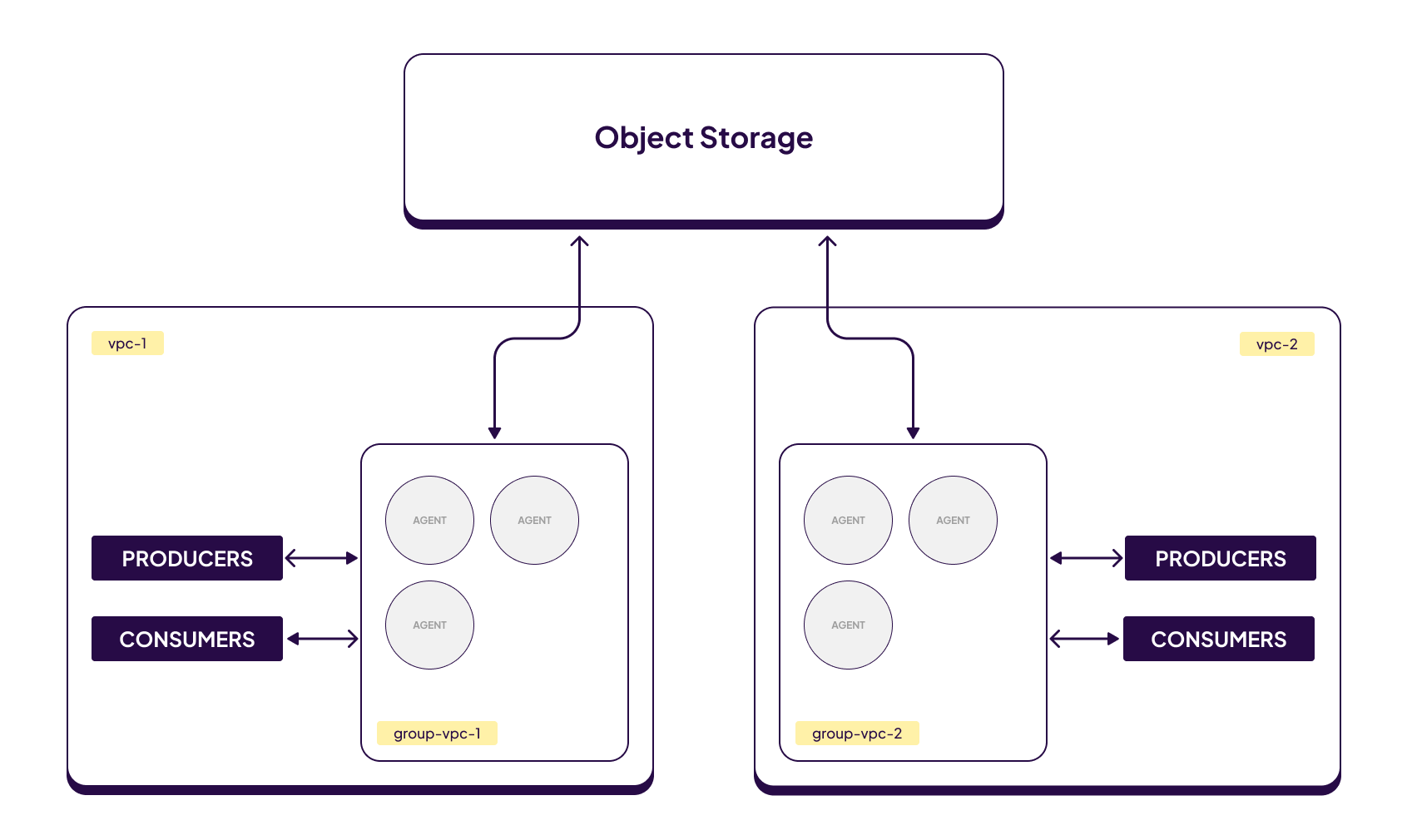
For example, consider the scenario where a single logical WarpStream cluster is "flexed" across multiple VPCs, regions, or even cloud providers:
In the diagram above producer and consumer clients running in `vpc_1` will only ever connect to Agents running in `group_vpc_1`. Similarly, producers and consumer running in `vpc_2` will only ever connect to Agents running in `group_vpc_2`. However, since both Agent Groups belong to the same logical virtual cluster and have access to the same object storage bucket, clients in each VPC will be able to write and read data for all topics and partitions, even those that were created by clients / Agents running in a completely different VPC!
Agent groups are a powerful abstraction that enable a variety of use-cases:
1. Isolating specific producers or consumers to dedicated Agent Groups to avoid noisy neighbors.
2. "Flexing" a single logical cluster across multiple VPCs, regions, or even clouds providers without resorting to complex VPC peering setups.
### Configuring Agent Goups
Configuring Agent Groups is simple. Just add the `-agentGroup $GROUP_NAME` flag to your Agent deployment. For example, if you wanted to flex a single logical WarpStream cluster across two Kubernetes clusters running in different VPCs:
```
# In Kubernetes cluster 1
warpstream agent -virtualClusterID $CLUSTER_ID -agentGroup group-1
# In Kubernetes cluster 2
warpstream agent -virtualClusterID $CLUSTER_ID -agentGroup group-2
```
Alternatively, you can set the `WARPSTREAM_AGENT_GROUP` environment variable instead.
{% hint style="info" %}
Agent group names may only contain lowercase letters, numbers, and dashes (-).
{% endhint %}
### Targeting Agent Groups
When your Kafka (or Schema Registry) client connects to an Agent in a specific group, the WarpStream service discovery system will ensure that your client only connects to other Agents in the same group. This means that in order to take advantage of the Agent group functionality, you need to ensure that the bootstrap URL you configure in your client will only ever resolve to Agents in the correct group.
#### Kubernetes
Targeting specific Agent Groups in Kubernetes is easy. Each Agent group will have its own helm deployment, and therefore its own Kubernetes service. Use the Kubernetes service name that corresponds to the Agent Group that you want to target as the bootstrap URL for your Kafka client.
In addition, we highly recommend setting the `ws_ag` [client ID feature](/warpstream/kafka/configure-kafka-client/configuring-kafka-client-id-features.md#warpstream_agent_group) on your Kafka clients. This is important in dynamic environments like K8s where pods churn frequently and I.P addresses may be quickly cycled between pods running in different agent groups. In that scenario, the Kubernetes service for agent group A may temporarily return the I.P address of an Agent in group B which will result in your client connecting and getting "stuck" in the wrong group.
{% hint style="info" %}
See [this link](/warpstream/agent-setup/deploy/kubernetes-known-issues.md#when-an-ip-is-reused-by-another-agents-pod) for more details about how I.P address reuse can cause problems for WarpStream clusters deployed in Kubernetes.
{% endhint %}
To avoid this issue, configure the name of the agent group you want to target in your client ID. For example, if your existing client ID is: `foo`, or `foo,ws_az=us-east-1a` and you want to target an agent group called `bar` then you should change your client ID to `foo,ws_ag=bar` or `foo,ws_az=us-east-1a,ws_ag=bar` respectively. This way, even if K8s service discovery returns a stale I.P address, the Agent that the client ends up connected to will know which agent group the client intended to connect to and be able to re-route it there.
#### Non-Kubernetes
Most non-Kubernetes deployments use WarpStream's hosted convenience bootstrap URL for service discovery. These URLs are visible in the WarpStream UI under the "Connect" tab in the cluster view and generally look something like this:
`api-XXXX-XXXX-XXXX-XXXX-XXXX.group$GROUP_NAME.kafka.discoveryv2.prod-z.us-east-1.warpstream.com:9092`\
\
Note that if you haven't explicitly configured any groups for your Agents yet, they will be part of the `default` group so the standard bootstrap URL for a WarpStream cluster that has not explicitly opted into specific groups yet would look like:
`api-XXXX-XXXX-XXXX-XXXX-XXXX.groupdefault.kafka.discoveryv2.prod-z.us-east-1.warpstream.com:9092`
If you want to connect to specific Agent groups just replace `default` with the name of your group, for example, if the agent group name was: `test-group-foo`, then the bootstrap URL would become:
`api-XXXX-XXXX-XXXX-XXXX-XXXX.grouptest-group-foo.kafka.discoveryv2.prod-z.us-east-1.warpstream.com:9092`
---
# Agent Instructions
This documentation is published with GitBook. GitBook is the documentation platform designed so that both humans and AI agents can read, navigate, and reason over technical content effectively. Learn more at gitbook.com.
## Querying This Documentation
If you need additional information that is not directly available in this page, you can query the documentation by asking a question.
Perform an HTTP GET request on the following URL with the `ask` and `goal` query parameters:
```
GET https://docs.warpstream.com/warpstream/kafka/advanced-agent-deployment-options/agent-groups.md?ask=&goal=
```
`ask` is the immediate question: it should be specific, self-contained, and written in natural language.
`goal` is what the user is ultimately trying to achieve, the reason they need the answer. Sharing it helps GitBook give you a better, more relevant answer. A goal is most helpful when it describes the outcome the user wants rather than restating the question. For example, with `ask=how do I create an API token`, a goal like `automate deployments from our CI pipeline` lets GitBook tailor the answer to that use case.
The response will contain a direct answer to the question and relevant excerpts and sources from the documentation.
Use this mechanism when the answer is not explicitly present in the current page, you need clarification or additional context, or you want to retrieve related documentation sections.