

# Enforce Schemas

## How Schema Validation Works

Historically, schemas stored in schema registries are used only by clients to serialize/deserialize and validate messages. With WarpStream, you can configure the agents to not only validate that the record contains a valid schema ID, but that the record actually conforms to the corresponding schema. The agent can then reject or emit metrics when it receives invalid records.

{% hint style="info" %}
Note that enabling schema validation will increase the CPU usage of the agent.
{% endhint %}

Currently, WarpStream supports two types of schema registries:

* Kafka-compatible Schema Registry
* AWS Glue Schema Registry

{% hint style="info" %}
For how to encode the records into the right serialization format, check out the [Serialization Format](#serialization-format) section.
{% endhint %}

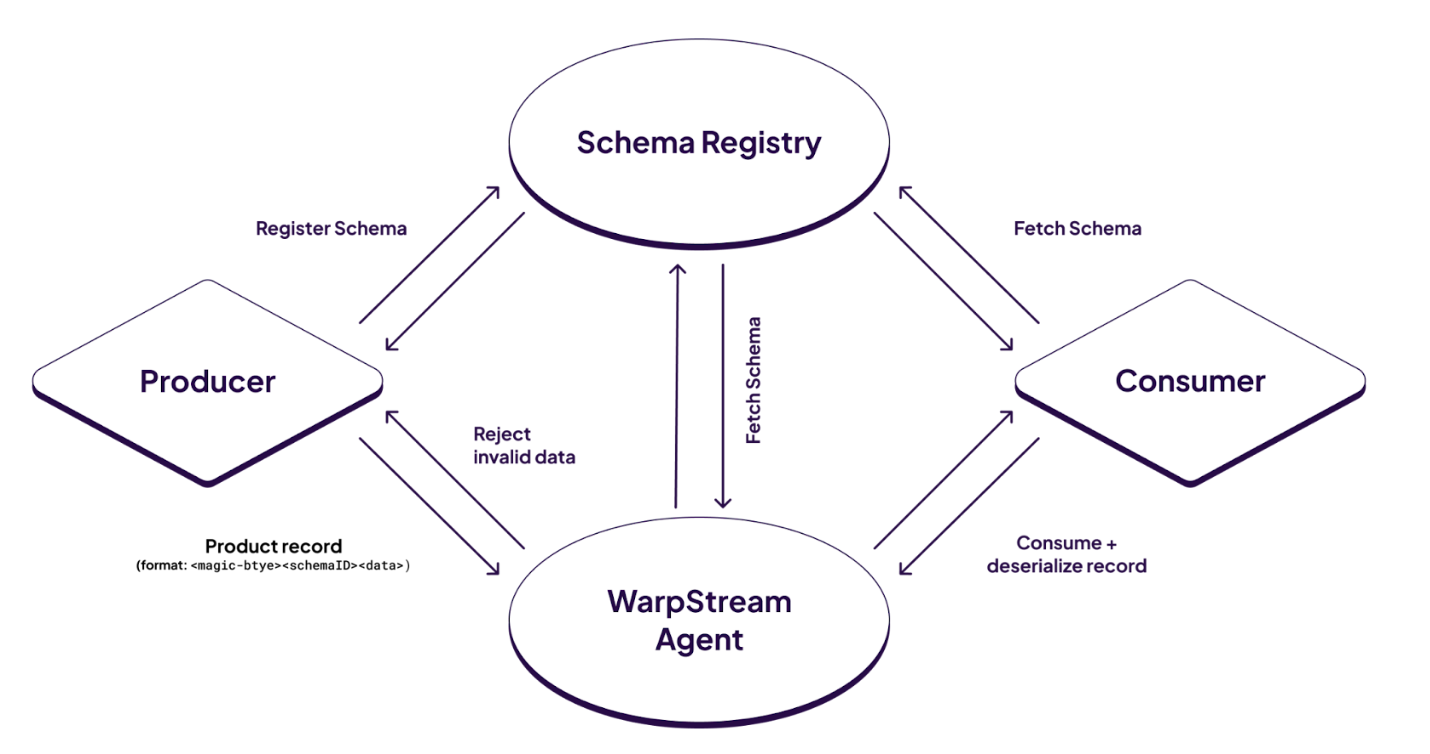
Here is a brief overview of how schema validation works in WarpStream:

* The producer serializes data with the schema retrieved from the schema registry and encodes it into the right serialization format.
* The producer send the data to a WarpStream agent.
* On receiving the message, the WarpStream agent decodes the message to obtain the schema ID (or Schema Version Id in the case of AWS Glue Schema Registry).
* The agent uses the schema ID to fetch the remote schema.
* Finally, the agent verifies if the data actually conforms to the schema and rejects (or emit metrics) any invalid records.

This process is illustrated in the diagram below:

<figure><img src="https://77315434-files.gitbook.io/~/files/v0/b/gitbook-x-prod.appspot.com/o/spaces%2FjB7FxO8ty4EXO4HsQP4E%2Fuploads%2Fgit-blob-4ae8b7148612664590afe64bf6b59ea0de931bd0%2Fimage.png?alt=media" alt=""><figcaption></figcaption></figure>

Currently, WarpStream supports the following schema formats: `Avro` and `JSON Schema` (with `Protobuf` coming soon).

Check out this overview video to learn more:

{% embed url="<https://vimeo.com/1069237948>" %}

## Serialization Format

Records must be serialized according to which schema registry you are using.

For Kafka-compatible schema registries, you must encode records using [Confluent's Wire Format](https://docs.confluent.io/platform/current/schema-registry/fundamentals/serdes-develop/index.html#wire-format). The first byte of the encoded record is always `0`. It is then followed by a 4-byte schema ID. Finally, the serialized data is appended to the end of the record.

<figure><img src="https://77315434-files.gitbook.io/~/files/v0/b/gitbook-x-prod.appspot.com/o/spaces%2FjB7FxO8ty4EXO4HsQP4E%2Fuploads%2Fgit-blob-45deee7a81bf72d5898a8be73beb6b2aee5c9931%2FScreenshot%202025-10-13%20at%205.19.49%E2%80%AFPM.png?alt=media" alt=""><figcaption></figcaption></figure>

For AWS Glue, the encoding starts off with a magic byte of 3, followed by one byte which denotes whether the data is compressed and 16 bytes of UUID which represents the schema. Finally, the data is appended at the end.

<figure><img src="https://77315434-files.gitbook.io/~/files/v0/b/gitbook-x-prod.appspot.com/o/spaces%2FjB7FxO8ty4EXO4HsQP4E%2Fuploads%2Fgit-blob-f8f52ed096101b43d9a98631613762d1cd61503d%2FScreenshot%202025-10-13%20at%205.20.11%E2%80%AFPM.png?alt=media" alt=""><figcaption></figcaption></figure>

## Topic Level Configurations for Schema Validation

Schema validation is configurable per topic. The following configurations can be provided when a topic is created or altered. Note that there are additional configurations depending on the schema registry type, which will be discussed in the next section.

<table><thead><tr><th width="284">Configuration</th><th>Description</th></tr></thead><tbody><tr><td><code>warpstream.key.schema.validation</code></td><td>Boolean config that indicates whether to validate the record key.</td></tr><tr><td><code>warpstream.value.schema.validation</code></td><td>Boolean config that indicates whether to validate the record value.</td></tr><tr><td><code>warpstream.schema.validation.warning.only</code></td><td><p>When an invalid record is detected, the Agent allows the record to be written, but emits a metric indicating that the record is invalid instead of rejecting the record.<br><br>The metric (counter) emitted is: <code>schema_registry_validation_invalid_record</code><br></p><p>Defaults to true.</p></td></tr><tr><td><code>warpstream.schema.registry.type</code></td><td><p>The type of schema registry that the schemas live in. Supported values include:</p><ul><li><code>"STANDARD"</code>: Any schema registries that are compatible with Confluent's schema registry</li><li><code>"AWS_GLUE"</code>: AWS Glue's Schema Registry.</li></ul><p>Defaults to <code>"STANDARD"</code></p></td></tr></tbody></table>

#### Topic Level Configurations for Kafka-compatible Schema Registries

Below are topic-level configurations for Kafka-compatible schema registries.

<table><thead><tr><th width="248">Configuration</th><th>Description</th></tr></thead><tbody><tr><td><code>warpstream.key.subject.name.strategy</code></td><td><p>Config that determines which schemas are allowed for the record key.</p><p>Allowed values: <code>TopicNameStrategy</code>, <code>RecordNameStrategy</code>, <code>TopicRecordNameStrategy</code>. See more details below.</p></td></tr><tr><td><code>warpstream.value.subject.name.strategy</code></td><td><p>Config that determines which schemas are allowed for the record key.</p><p>Allowed values: <code>TopicNameStrategy</code>, <code>RecordNameStrategy</code>, <code>TopicRecordNameStrategy</code>. See more details below.</p></td></tr></tbody></table>

#### **Subject Name Strategy:**

Each schema in the Schema Registry is registered under a subject. During schema validation, the agent looks up the subject for the schema ID and verifies that the subject conforms to the subject name strategy.

There are three subject name strategies:

| Strategy                | Definition                                                                                                                                                                            |
| ----------------------- | ------------------------------------------------------------------------------------------------------------------------------------------------------------------------------------- |
| TopicNameStrategy       | <p>The subject is derived from the topic name with the following format:</p><ul><li>\<topic name>-key for the record key</li><li>\<topic value>-value for the record value.</li></ul> |
| RecordNameStrategy      | The subject is the schema’s fully-qualified record name.                                                                                                                              |
| TopicRecordNameStrategy | The subject is a combination of the topic name and the record name with the following format: \<topic name>-\<fully-qualified record name>                                            |

The fully-qualified record name for Avro is the record’s namespace + record name. For JSON Schema, the record name is the `title`.

## Using WarpStream's BYOC Schema Registry for Schema Validation

Our goal is to make it as easy as possible to perform schema validation with WarpStream's BYOC Schema Registry. To configure the agent to perform schema validation using schemas from your BYOC Schema Registry cluster, you need to do two things:

* Set the `-schemaValidationVirtualClusterID` flag to your Schema Registry's Virtual Cluster ID when deploying your agent. Alternatively, you can set the environment variable `WARPSTREAM_SCHEMA_VALIDATION_VIRTUAL_CLUSTER_ID` to your Virtual Cluster ID.
* Configure your agent to have the permission to read existing files from the object storage bucket that holds the schemas for your BYOC Schema Registry. In the case of AWS, this is the `GetObject` permission. In the case of GCP, this is the `storage.objects.get` permission.

Once the flag is set and the object storage permissions are provided, the agent will automatically fetch schemas from the object storage that holds the schemas for your BYOC Schema Registry when performing schema validation.

## Connecting to External Kafka-Compatible Schema Registry

To allow the agent to connect to a Kafka-specific schema registry, set the `-schemaRegistryURL` flag to the URL of the schema registry. Alternatively, you can also set the `WARPSTREAM_SCHEMA_REGISTRY_URL` environment variable.

### Authentication

Most schema registry implementations support some form of authentication. WarpStream supports connecting to external schema registries with MTLS, TLS, or basic authentication.

#### Basic Authentication

For basic authentication, supply the `username` and `password` as follows:

* set the `-externalSchemaRegistryBasicAuthUsername` flag to the username of the schema registry. Alternatively, set the `WARPSTREAM_EXTERNAL_SCHEMA_REGISTRY_BASIC_AUTH_USERNAME` environment variable
* set the `-externalSchemaRegistryBasicAuthPassword` flag to the password of the schema registry. Alternatively, set the `WARPSTREAM_EXTERNAL_SCHEMA_REGISTRY_BASIC_AUTH_PASSWORD` environment variable

#### TLS/MTLS

For `mTLS`, the agent needs both a certificate and a private key to enable the schema registry server to authenticate the agent.

You can use the `-externalSchemaRegistryTlsClientCertFile` and `-externalSchemaRegistryTlsClientPrivateKeyFile` to pass in the **file paths** to the agent certificate and private key, respectively. Alternatively, you can use `WARPSTREAM_EXTERNAL_SCHEMA_REGISTRY_TLS_CLIENT_CERT_FILE` and `WARPSTREAM_EXTERNAL_SCHEMA_REGISTRY_TLS_CLIENT_PRIVATE_KEY_FILE` environment variables.

For TLS and mTLS, you can optionally add a **file path** to the root certificate authority certificate file which the Agent will use to verify the schema registry server's certificate. Use the `-externalSchemaRegistryTlsServerCACertFile` flag, or the `WARPSTREAM_EXTERNAL_SCHEMA_REGISTRY_TLS_SERVER_CA_CERT_FILE` environment variable.

## Connecting to AWS Glue Schema Registry

The agent must be deployed in AWS to connect to an AWS Glue schema registry. In addition, you'll also need to make sure the Agent containers have the appropriate permissions to read from the schema registry.

Below is an example Terraform configuration for an AWS IAM policy document that provides WarpStream with the appropriate permissions to access an AWS Glue schema registry.

<pre class="language-hcl"><code class="lang-hcl">data "aws_iam_policy_document" "warpstream_aws_glue_policy_document" {
  statement {
    sid = "AWSGlueSchemaRegistryReadonlyAccess"
    actions = [
      "glue:GetSchemaVersion"
    ]

    effect    = "Allow"
<strong>    resources = [ "*" ]
</strong>  }
}
</code></pre>

Note that there is currently a [terraform bug](https://github.com/awslabs/aws-glue-schema-registry/issues/68) that prevents providing the specific registry arn for the iam policy for AWS Glue. You would have to use `"*"` instead as showed in the example.

## Limitations

Here are the list of schema features that are currently not supported:

#### JSON Schema

* Regular Expressions
* Remote references (WarpStream supports referencing schemas that are part of the schema stored in the schema registry but not to remote schemas)
* [Conditional schema validation](https://docs.warpstream.com/warpstream/kafka/reference/protocol-and-feature-support) (`dependentRequired`)
* `$dynamicRef` and `$dynamicAnchor`
* `contentMediaType`
