> For the complete documentation index, see [llms.txt](https://docs.warpstream.com/warpstream/llms.txt). Markdown versions of documentation pages are available by appending `.md` to page URLs; this page is available as [Markdown](https://docs.warpstream.com/warpstream/kafka/advanced-agent-deployment-options/configure-warpstream-agent-within-a-container-or-behind-a-proxy.md).
# Network Architecture Considerations
This page describes a variety of different approaches that can be used to deploy WarpStream with more advanced network setups.
## Normal Network Architecture Setup
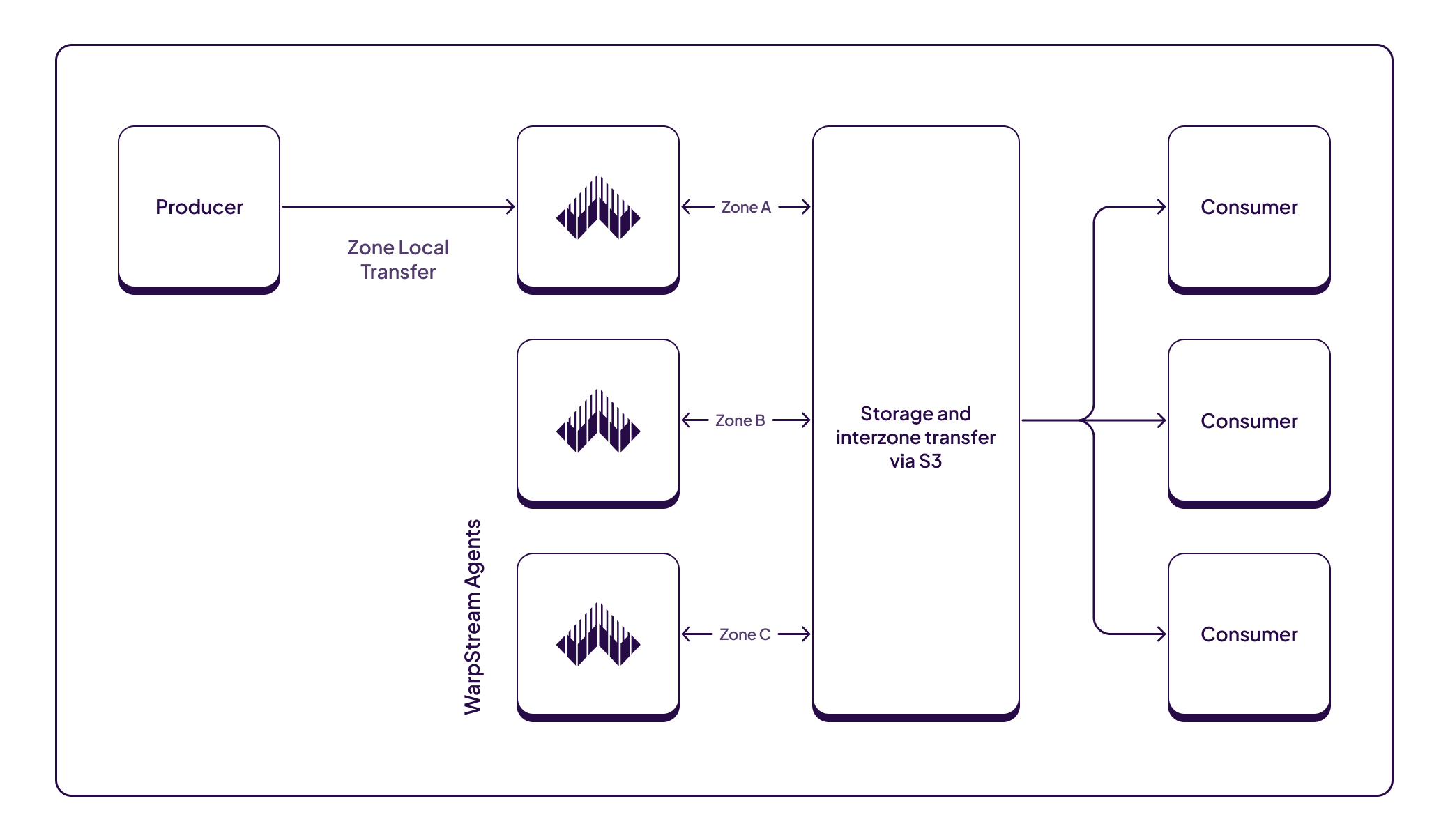
In most WarpStream deployments, client applications must connect directly to the WarpStream agents. This requires direct layer 3 network connectivity between the client applications and agents with no proxies, load balancers, NATing, etc. in the middle.
The below architecture is a normal network architecture where all the applications can directly communicate with all the WarpStream agents.
This is the recommended architecture for most WarpStream deployments because it is the easiest, most-effective, and most performant way to run a WarpStream cluster.
## Approaches for Connectivity Between Unconnected Networks
In some situations, the direct connectivity described in the previous section is not always possible or desired. One example situation would be when the WarpStream agents are deployed in a Kubernetes cluster, but the client applications are deployed outside of the Kubernetes cluster in a completely different VPC.
There are two different approaches for enabling connectivity between Kafka Clients and the WarpStream Agents when the clients and agents are running in different networks with no direct connectivity between them:
1. [Agent Groups](/warpstream/kafka/advanced-agent-deployment-options/agent-groups.md)
2. [TCP Load Balancer](#tcp-load-balancer)
In general, Agent Groups are the preferred solution. They're easier to set up, (generally) more cost-effective, and they don't suffer from any of the [performance penalties](#why-tcp-load-balancers-can-cause-performance-problems) that are associated with using a TCP load balancer.
### Agent Groups (recommended)
{% hint style="info" %}
Agent Groups are the recommended approach for solving lack of direct connectivity between Kafka clients and WarpStream agents. The only scenario where we don't recommend this approach is if it will require a very high number of Agent groups.
{% endhint %}
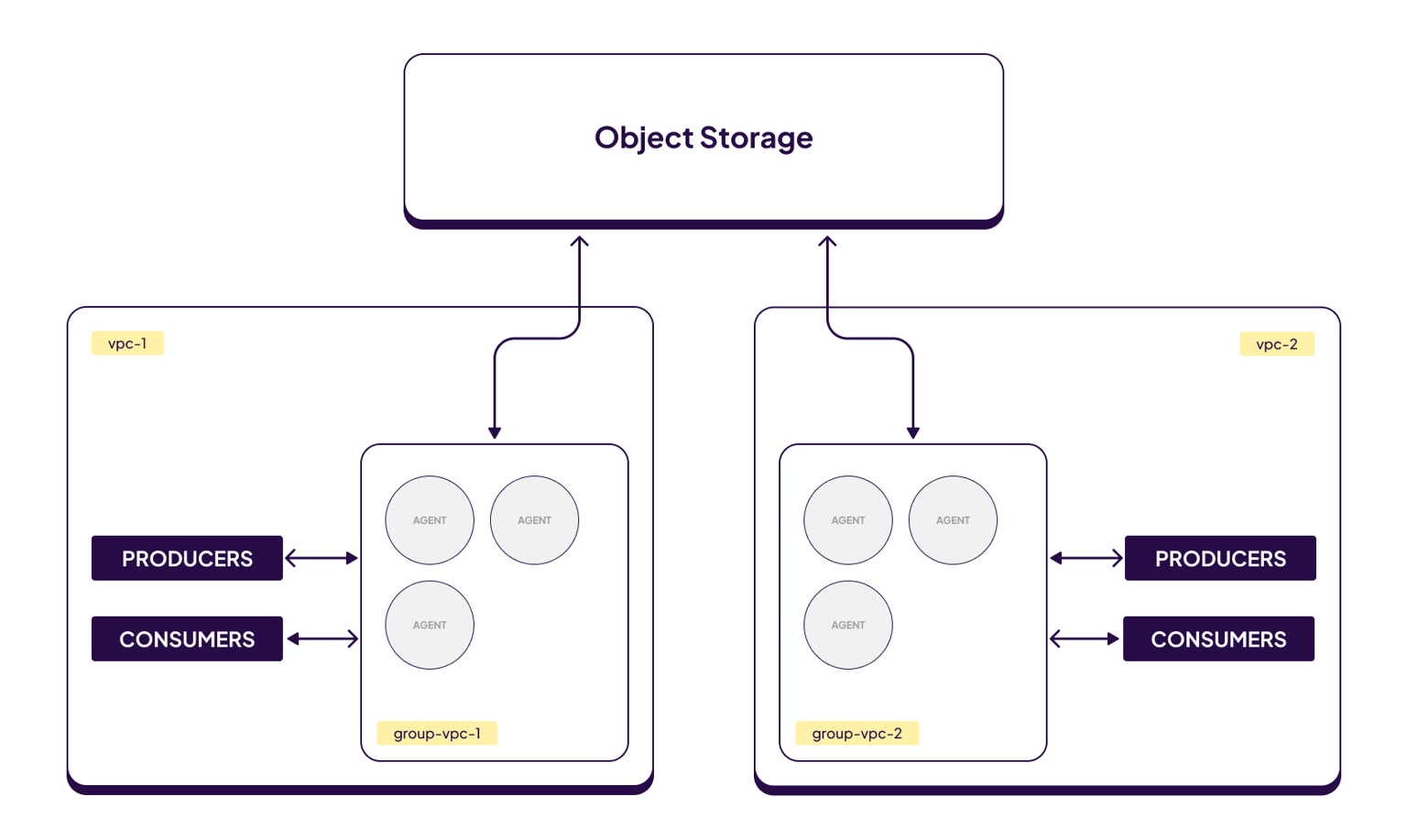
WarpStream's diskless architecture means that any Agent can write or read data for any topic-partition. As a result, WarpStream clusters can be split into distinct "groups" that are completely isolated from each other at the networking / service discovery layer.
This feature is called Agent Groups and is very useful for enabling a single WarpStream cluster to be flexed across multiple disparate networks with no inter-connectivity without incurring the cost and [performance penalties](#why-tcp-load-balancers-can-cause-performance-problems) of using a TCP load balancer.
For more details, read the [Agent Groups documentation](/warpstream/kafka/advanced-agent-deployment-options/agent-groups.md).
### TCP Load Balancer
{% hint style="danger" %}
Make sure you've at least considered using the [Agent Groups](/warpstream/kafka/advanced-agent-deployment-options/agent-groups.md) approach before deploying a TCP load balancer for WarpStream.
While you **can** run the WarpStream Agents behind a load balancer, keep in mind that it may result in [reduced performance](#why-tcp-load-balancers-can-cause-performance-problems). Whenever possible, direct connectivity between Kafka clients and the WarpStream Agents is preferred, especially for high volume workloads.
{% endhint %}
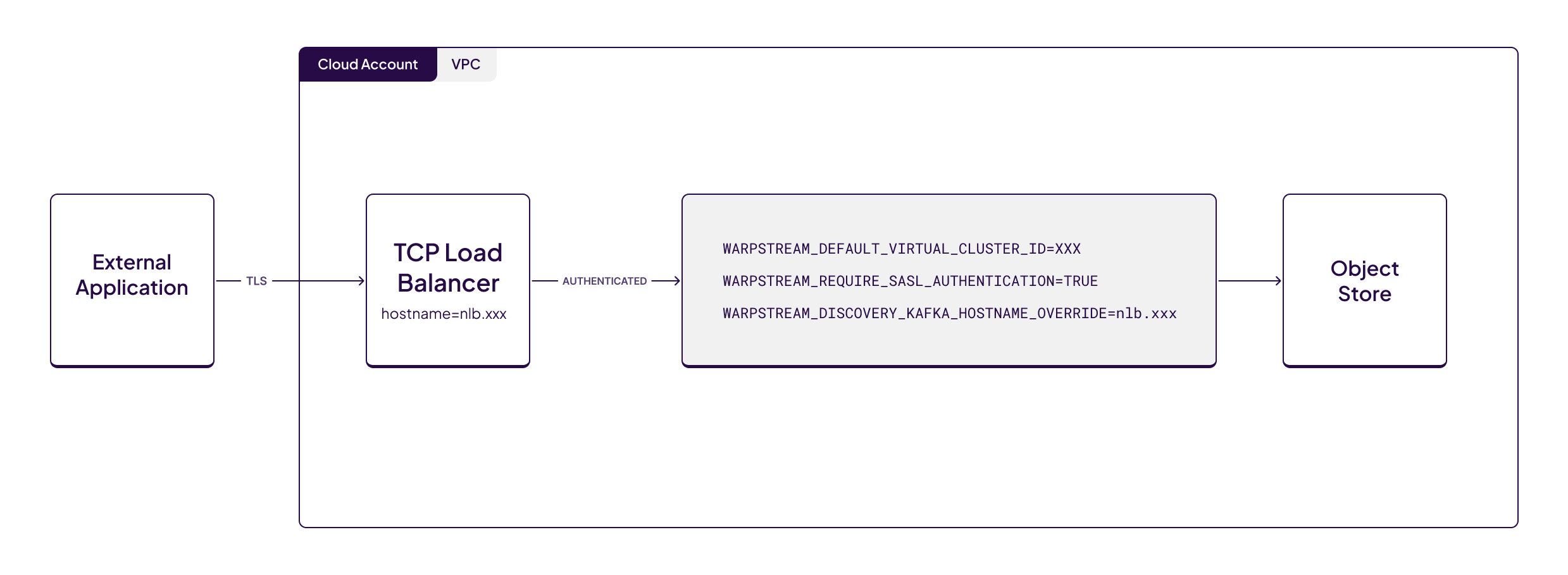
If the Agent Group approach is not viable for some reason, you'll have to setup a TCP load balancer instead.
{% hint style="info" %}
When exposing WarpStream to external networks (I.E over the internet) it is highly recommended to configure TLS and Authentication. See [TLS](/warpstream/kafka/manage-security/protect-data-in-motion-with-tls-encryption.md), [SASL Authentication](/warpstream/kafka/manage-security/sasl-authentication.md), [Mutual TLS (mTLS)](/warpstream/kafka/manage-security/mutual-tls-mtls.md) for configuration details.
{% endhint %}
Agent configuration:
* `WARPSTREAM_DEFAULT_VIRTUAL_CLUSTER_ID=$VIRTUAL_CLUSTER_ID`
* `WARPSTREAM_REQUIRE_SASL_AUTHENTICATION=true`
* `WARPSTREAM_DISCOVERY_KAFKA_HOSTNAME_OVERRIDE=$LOAD_BALANCER_HOSTNAME`
In some cases, the load balancer may be listening on a port that's different from the port the Agents are listening on (defaut `9092` for TCP/Kafka protocol traffic). In that scenario, you'll need to add one additional environment variable to the Agent configuration:
```
WARPSTREAM_DISCOVERY_KAFKA_PORT_OVERRIDE=$EXTERNAL_NLB_PORT
```
This instructs the Agents to advertise the load balancer's port within the Kafka protocol instead of the port that the Agents are listening on.
{% hint style="info" %}
Note that this change will make the Agents **advertise** a different port within the Kafka protocol, but they'll continue **listening** on the same port (default `9092`) so traffic between the load balancer and the Agents will not be impacted by this change. It's just required due to a quirk of how service discovery within the Kafka protocol works.
{% endhint %}
### Kubernetes
{% hint style="danger" %}
Keep in mind that introducing TCP load balancers between Kafka clients and the WarpStream Agents can lead to [performance issues](#why-tcp-load-balancers-can-cause-performance-problems).
Whenever possible, try to solve connectivity problems with [Agent Groups](/warpstream/kafka/advanced-agent-deployment-options/agent-groups.md) instead.
{% endhint %}
Running WarpStream within Kubernetes can be simple and straightforward with our [Helm charts](/warpstream/agent-setup/infrastructure-as-code/helm-charts.md).
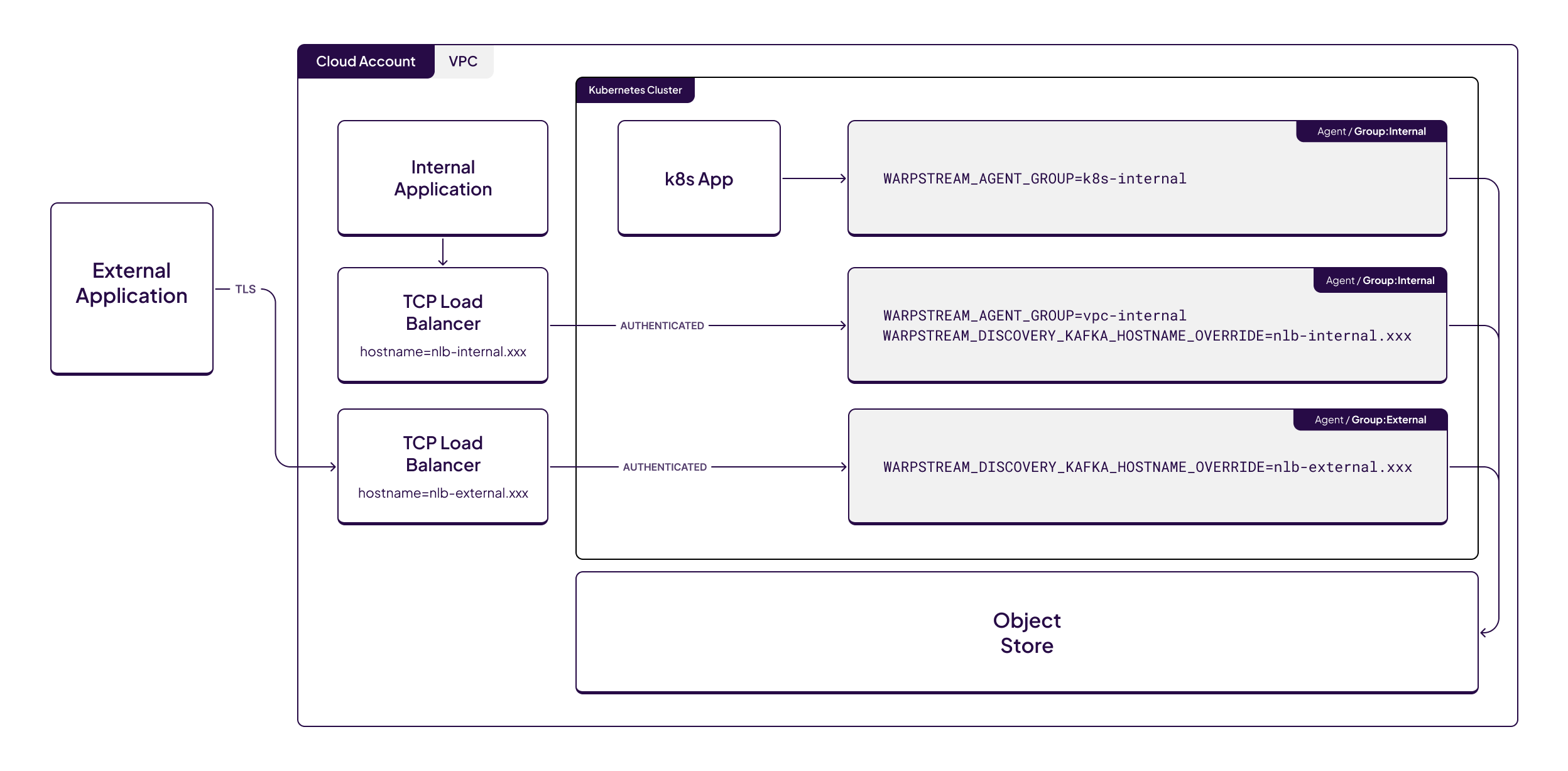
However, when applications that are running outside of the Kubernetes cluster / VPC need to connect to WarpStream additional configuration may be required.
In this example setup we will have at least 3 helm deployments for 3 different agent groups. See [Agent Groups](/warpstream/kafka/advanced-agent-deployment-options/agent-groups.md) for information about groups.
Agent Group One will handle applications running in the same Kubernetes cluster as the agents via direct connectivity within Kubernetes.
Agent Group Two will handle applications running in the same VPC as the Kubernetes cluster but not running in the Kubernetes cluster itself.
{% hint style="info" %}
In some setups this group isn't needed due to pod IPs being routable on the VPC, consult your cloud provider's Kubernetes documentation for details about routable pod IPs.
{% endhint %}
Agent Group Three will handle applications running outside of the VPC, for example connecting over the internet.
In all three cases the bootstrap server will be printed out in the `NOTES` section during the `helm install`.
Bellow are the recommended helm values to set for the various groups.
{% code title="one-values.yaml" lineNumbers="true" %}
```yaml
config:
agentGroup: one
bucketURL:
apiKey:
virtualClusterID:
region:
```
{% endcode %}
{% code title="two-values.yaml" lineNumbers="true" %}
```yaml
config:
agentAroup: two
bucketURL:
apiKey:
virtualClusterID:
region:
kafkaService:
enabled: true
annotations:
# Uncomment one of the following annotations depending on your Cloud Provider
# networking.gke.io/load-balancer-type: "Internal"
# service.beta.kubernetes.io/azure-load-balancer-internal: "true"
# service.beta.kubernetes.io/aws-load-balancer-scheme: "internal"
type: LoadBalancer
port: 9092
# Override the hostname to be the hostname of the internal TCP Load Balancer
# In some environments this isn't needed if your Kubernetes pod IPs are routable.
# See your Kubernetes provider network documentation for details.
extraEnv:
- name: WARPSTREAM_DISCOVERY_KAFKA_HOSTNAME_OVERRIDE
# Replace this with the hostname of your internal TCP load balancer
value: nlb-internal.xxx
```
{% endcode %}
{% code title="three-values.yaml" lineNumbers="true" %}
```yaml
config:
agentGroup: three
bucketURL:
apiKey:
virtualClusterID:
region:
kafkaService:
enabled: true
annotations:
# If using AWS EKS uncomment the following annotation
# service.beta.kubernetes.io/aws-load-balancer-scheme: "internet-facing"
type: LoadBalancer
port: 9092
# Set a certificate since this load balancer is exposed to the internet
certificate:
enableTLS: true
# The Kubernetes TLS secret that contains a certificate and private key
# see https://kubernetes.io/docs/concepts/configuration/secret/#tls-secrets
secretName: warpstream-external-tls
# If using mtls uncomment the following
# mtls:
# enabled: true
#
# # The secret key reference for the certificate authority public key
# certificateAuthoritySecretKeyRef:
# name: "warpstream-external-tls"
# key: "ca.crt"
# Override the hostname to be the hostname of the external TCP Load Balancer
extraEnv:
- name: WARPSTREAM_DISCOVERY_KAFKA_HOSTNAME_OVERRIDE
# Replace this with the hostname of your external TCP load balancer
value: nlb-external.xxx
# If using SASL authentication uncomment the following
# - name: WARPSTREAM_REQUIRE_SASL_AUTHENTICATION
# value: "true"
#
# If using mTLS authentication uncomment the following
# - name: WARPSTREAM_REQUIRE_MTLS_AUTHENTICATION
# value: "true"
```
{% endcode %}
You can then install all three agent groups by running the following commands:
```bash
helm upgrade --install warpstream-agent-one warpstream/warpstream-agent \
--namespace $YOUR_NAMESPACE \
--values one-values.yaml
helm upgrade --install warpstream-agent-two warpstream/warpstream-agent \
--namespace $YOUR_NAMESPACE \
--values two-values.yaml
helm upgrade --install warpstream-agent-three warpstream/warpstream-agent \
--namespace $YOUR_NAMESPACE \
--values three-values.yaml
```
When using AWS EKS it is recommended to use the [AWS Load Balancer Controller](https://docs.aws.amazon.com/eks/latest/userguide/aws-load-balancer-controller.html), the old in-tree or out-of-tree cloud provider for EKS is considered [Legacy](https://docs.aws.amazon.com/eks/latest/userguide/aws-load-balancer-controller.html) by AWS. While it is still possible to use the legacy provider for Load Balancers there is little available public documentation and the required annotations may be different.
## Additional Configuration
### Client Specific Override
It is sometimes useful to override the hostname on a client level. This is typically needed when using `kubectl port-forward`.
Set the `ws_host_override` parameter **within the client's** ID when creating the Kafka client (check [Configuring Kafka Client ID Features](/warpstream/kafka/configure-kafka-client/configuring-kafka-client-id-features.md) for more details):
```go
kgo.NewClient(...,
kgo.ClientID("ws_host_override=127.0.0.1"),
)
```
Our recommendation is to only use the above configuration in debugging situations and not long-term deployments.
### Internal Listener Override
WarpStream agents must be able to directly communicate with each other. [They need to communicate to efficiently share files and data](https://www.warpstream.com/blog/minimizing-s3-api-costs-with-distributed-mmap).
In rare situations it may be necessary to override the internal agent to agent hostname.
This can be done by setting the `-advertiseHostnameStrategy` flag or the `WARPSTREAM_ADVERTISE_HOSTNAME_STRATEGY` environment variable to `custom`. Then, provide the custom hostname by setting either the `-advertiseHostnameCustom` flag or the `WARPSTREAM_ADVERTISE_HOSTNAME_CUSTOM` environment variable.
However, our recommendation is to always allow agents to directly communicate with each other and not adjust the above mentioned configurations.
## FAQ
### Why TCP Load Balancers Can Cause Performance Problems
There are two reasons that introducing a load balancer between Kafka clients and the WarpStream Agent can result in performance problems:
1. WarpStream has a built-in load balancing mechanism that keeps the WarpStream Agents evenly utilized.
2. While any Agent can handle writes or reads for any partition, WarpStream will generally try to align writes/reads for the same topic-partition from different clients on the same Agent. This improves data locality which dramatically improves performance in a variety of different dimensions (latency, utilization, compression, etc).
Both of these mechanisms rely on WarpStream controlling (via the Kafka protocol) which clients connect to which Agents. As a result, these mechanisms degrade when a load balancer is inserted between the Kafka clients and the WarpStream Agents.
For well behaved workloads, WarpStream can still work well when running behind a load balancer, but direct connectivity between Kafka clients and the WarpStream Agents is always recommended for the most demanding workloads.
{% hint style="info" %}
Whenever possible, try to solve connectivity problems with [Agent Groups](#agent-groups-recommended) instead.
{% endhint %}
### Typical issues when hostname is not overridden correctly
WarpStream agents utilize their private IP and ports for ongoing connections after the initial bootstrap. Without the correct configurations, clients might connect to bootstrap successfully yet experience issues when progressing beyond the initial phase.
For example you may receive the following errors when hostname override is incorrectly set:
{% code overflow="wrap" %}
```
% warpstream cli diagnose-connection -bootstrap-host my-kafka.example.com
running diagnose-connection sub-command with bootstrap-host: my-kafka.exampl.com and bootstrap-port: 9092
Broker Details
---------------
10.212.2.26:9092 (NodeID: 1195648645)
failed to communicate with Agent returned as part of Kafka Metadata response, err: , this usually means that the provided bootstrap host: my-kafka.exampl.com:9092 is accessible on the current network, but the URL that the Agent is advertising as its broker host/ip: 10.212.2.26:9092 is not accessible on this network. If this is occurring during local development whilst running the Agent in a docker container, consider adding the following flag to the docker run command: --env "WARPSTREAM_PRIVATE_IP_OVERRIDE=127.0.0.1" which will force the Agent to advertise its hostname/IP address as localhost for development purposes.
```
{% endcode %}
{% code overflow="wrap" %}
```
% kafka-topics --bootstrap-server my-kafka.example.com --list
[2025-02-03 15:08:19,631] WARN [AdminClient clientId=adminclient-1] Connection to node 1195648645 (10.212.2.26:9092) could not be established. Node may not be available. (org.apache.kafka.clients.NetworkClient)
```
{% endcode %}
In these examples we are trying to connect to `my-kafka.example.com`. However, the `WARPSTREAM_DISCOVERY_KAFKA_HOSTNAME_OVERRIDE` environment variable is not set on the agent to that hostname. We can see that the Kafka clients are trying to connect to `10.212.2.26:9092`which is the private IP of the agent. Our Kafka clients cannot connect to the IP so they fail with connection errors.
---
# Agent Instructions
This documentation is published with GitBook. GitBook is the documentation platform designed so that both humans and AI agents can read, navigate, and reason over technical content effectively. Learn more at gitbook.com.
## Querying This Documentation
If you need additional information that is not directly available in this page, you can query the documentation by asking a question.
Perform an HTTP GET request on the following URL with the `ask` and `goal` query parameters:
```
GET https://docs.warpstream.com/warpstream/kafka/advanced-agent-deployment-options/configure-warpstream-agent-within-a-container-or-behind-a-proxy.md?ask=&goal=
```
`ask` is the immediate question: it should be specific, self-contained, and written in natural language.
`goal` is what the user is ultimately trying to achieve, the reason they need the answer. Sharing it helps GitBook give you a better, more relevant answer. A goal is most helpful when it describes the outcome the user wants rather than restating the question. For example, with `ask=how do I create an API token`, a goal like `automate deployments from our CI pipeline` lets GitBook tailor the answer to that use case.
The response will contain a direct answer to the question and relevant excerpts and sources from the documentation.
Use this mechanism when the answer is not explicitly present in the current page, you need clarification or additional context, or you want to retrieve related documentation sections.