> For the complete documentation index, see [llms.txt](https://docs.warpstream.com/warpstream/llms.txt). Markdown versions of documentation pages are available by appending `.md` to page URLs; this page is available as [Markdown](https://docs.warpstream.com/warpstream/kafka/manage-security/configure-acls.md).
# ACLs
The following page provides a management guide for ACLs (Access Control Lists). This document provides instructions on how to enable, disable, create, and delete ACLs for your WarpStream clusters.
## Prerequisites
Before you begin, ensure you have administrative access to the WarpStream console and are familiar with the basic concepts of ACLs.
The current version of ACLs supports SASL and mTLS authentication method. Review [Authentication](https://github.com/warpstreamlabs/docs/blob/master/kafka/manage-security/broken-reference/README.md) for more information.
{% hint style="danger" %}
**Important:** ACLs are only compatible with **Agent version 526 and above**. Make sure you use a compatible agent version, if your cluster has self-hosted agents.
{% endhint %}
## Important considerations
There are a few things to keep in mind when using ACLs, which are covered below.
### ACL Principal
ACLs operate using Principals, which are entities capable of being authenticated by the Authorizer. In the context of WarpStream agents, clients authenticate as a specific principal by using either SASL or mTLS authentication.
**With SASL/PLAIN or SASL/SCRAM-SHA-512**, the principal is identified by one of the three following:
1. The assigned **username** (prefixed with `ccun_`)
2. Chosen **name** during [credential creation](#generating-credentials), (prefixed with `ccn_`)
3. Chosen **name** during [credential creation](#generating-credentials), without prefix `ccn_`
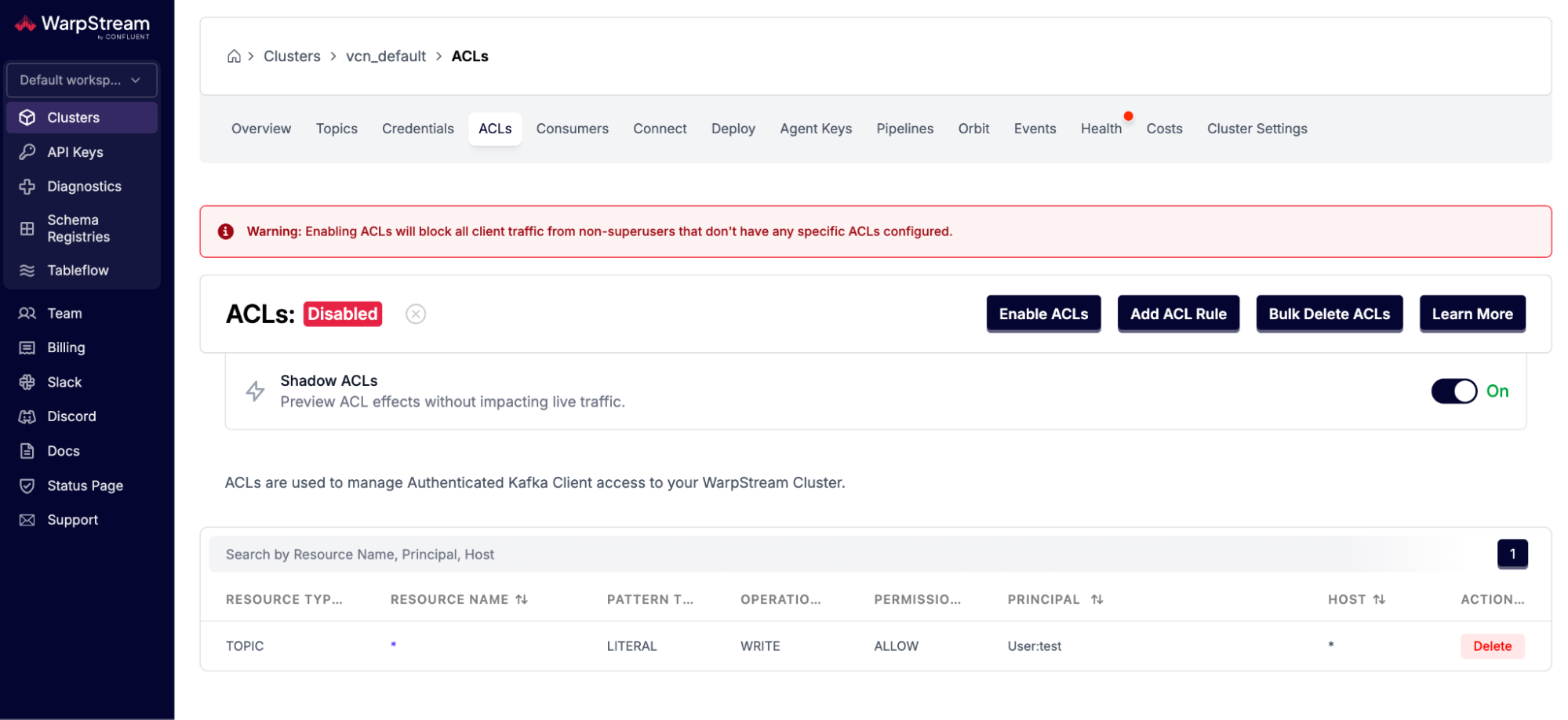
In the screenshot below, valid principal examples include: `user_1234`, `ccn_user_1234`, and `ccun_3cc6c05a56b396fc084ef1e113150970cd148c87b5f64babfd3b8cf67d4d8840`.
**With mTLS**, the principal is either the Distinguished Name(DN) from the client TLS certificate, or extracted from the DN according to the `-tlsPrincipalMappingRule` flag set in the Agents as described in the [mutual tls authentication](/warpstream/kafka/manage-security/mutual-tls-mtls.md) page.
**With SASL/OAUTHBEARER** the principal is identified by the `subject` of the OAuth token.
All principals should be prefixed with `User:` when creating ACL rules.
### Super users
In the context of ACLs, a 'superuser' is a specially designated user who possesses elevated privileges. Superusers are granted overarching access rights, allowing them to bypass standard ACL restrictions. This includes unrestricted abilities to create, modify, or delete resources, and to manage access controls for other users.
**For SASL/PLAIN or SASL/SCRAM-SHA-512**, you can authorize as super user by setting your SASL username as either the generated cluster credentials username(`ccun_`) or by using the "Name" which you set while generating credentials. You can create super users through the credentials, as explained at [SASL Generating Credentials.](/warpstream/kafka/manage-security/sasl-authentication.md#creating-credentials)
**For mTLS**, you can create super users by clicking the "Create mTLS Super User" button in the Credentials page and entering the certificate DN or TLS principal.
**For SASL/OAUTHBEARER**, you can create super users by clicking the "Create mTLS Super User" button in the Credentials page and entering the OAuth subject you want to be a super user.
### Caching of ACLs
For performance reasons, ACLs are cached, so changes to ACLs may take between 30 seconds to 1 minute to take effect. Plan accordingly when updating ACLs in a production environment to ensure a smooth transition.
### allow\.everyone.if.no.acl.found
Warpstream does not implement the `allow.everyone.if.no.acl.found` Kafka configuration, because:
1. It's not safe for production environments.
2. You can get the equivalent (and safer) behaviour by simply using [#super-users](#super-users "mention"), who are authorized to access everything.
## ACL Shadowing
ACL Shadowing allows a WarpStream cluster to evaluate Kafka ACLs against live traffic without enforcing authorization decisions. This mode is designed to help operators validate ACL behavior before enabling full ACL enforcement.
When ACL Shadowing is enabled:
* All incoming requests are evaluated against the cluster’s configured ACLs.
* Authorization results are not enforced (no requests are blocked).
* Would-be denials are [logged](#denied-authorization-logs) and surfaced through [Diagnostics](/warpstream/agent-setup/monitor-the-warpstream-agents/diagnostics.md).
ACL Shadowing can be enabled from the WarpStream Console in the ACLs tab for your cluster or via [Terraform](https://registry.terraform.io/providers/warpstreamlabs/warpstream/latest/docs/resources/virtual_cluster).
Note that ACL Shadowing will be automatically disabled when you enable ACLs for your cluster.
## Enabling and Disabling ACLs
{% hint style="danger" %}
**Warning**
Before enabling ACLs, be aware that improper configurations may lead to denied access for producers and consumers. Make sure to configure ACLs correctly to avoid any disruption of service.
{% endhint %}
### To Enable ACLs
1. Navigate to the [WarpStream console](https://console.warpstream.com/virtual_clusters).
2. Select the desired Virtual Cluster, for example `vcn_default`.
3. Click on the `ACLs` tab.
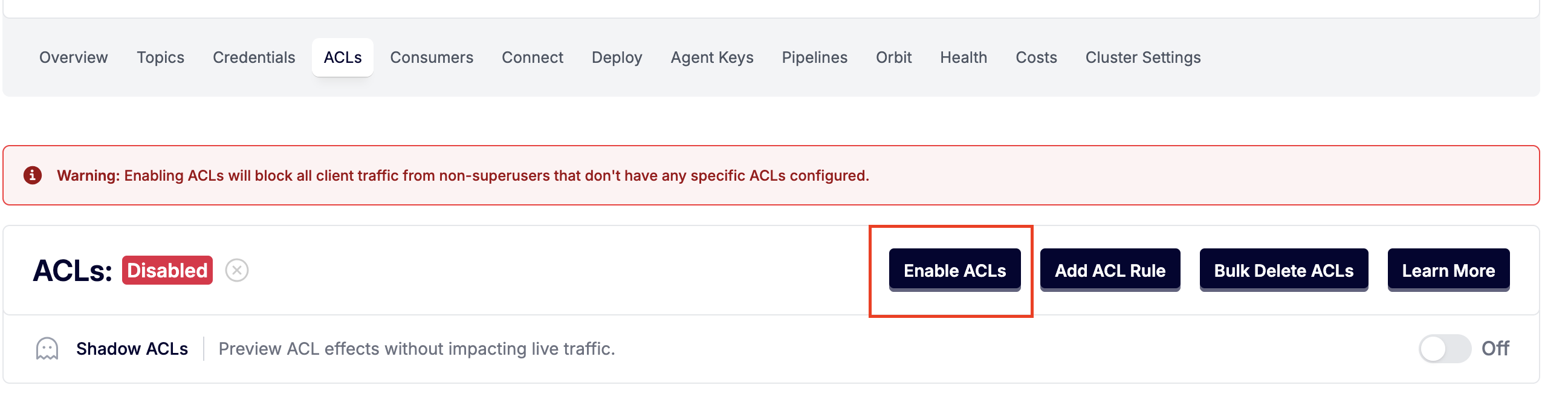
4. You will see the `ACLs: Disabled` status label if ACLs are currently disabled.
5. Click on the `Enable ACLs` button to change its status to `Enabled`.
### To Disable ACLs
1. Follow the same steps to navigate to the `ACLs` tab of your Virtual Cluster.
2. If ACLs are enabled, you will see the `ACLs: Enabled` status label.
3. Click on the `Disable ACLs` button to turn off ACLs for the cluster.
### Enable/Disable Using the HTTP API
Alternatively, you can switch ACLs on and off using the HTTP APIs, which is a convenient alternative to doing it through the console UI. Refer to [DescribeConfiguration](/warpstream/reference/api-reference/virtual-clusters/describeconfiguration.md) and [UpdateConfiguration](/warpstream/reference/api-reference/virtual-clusters/updateconfiguration.md) for details.
## Generating Credentials
To interact with WarpsSream clusters, you need to generate credentials:
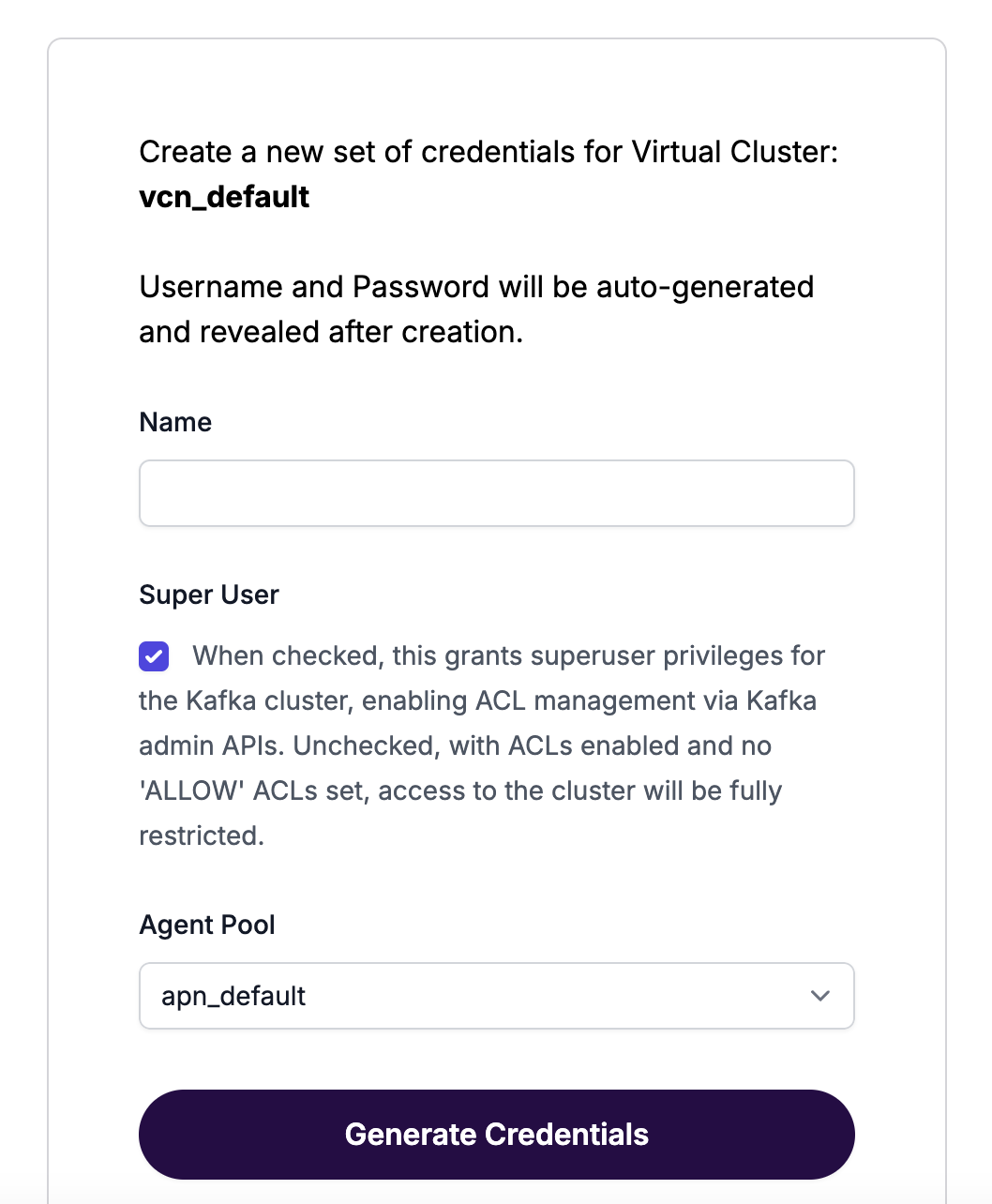
1. Within the WarpStream console, navigate to the `Credentials` tab of your Virtual Cluster.
2. Click on `Generate Credentials`.
3. Provide a name for the credentials.
4. If necessary, enable `Super User` for broader permissions.
* **Important:** If a resource has no associated ACLs, then only superusers can access that resource.
5. Click `Generate Credentials`. The credentials will be displayed for you to use with the CLI.
{% hint style="info" %}
**Important**: Credentials are shown only once. Store them securely.
{% endhint %}
## Managing ACLs via WarpStream Console
1. Navigate to the [WarpStream console](https://console.warpstream.com/virtual_clusters).
2. Select the desired Virtual Cluster, for example `vcn_default`.
3. Click on the `ACLs` tab.
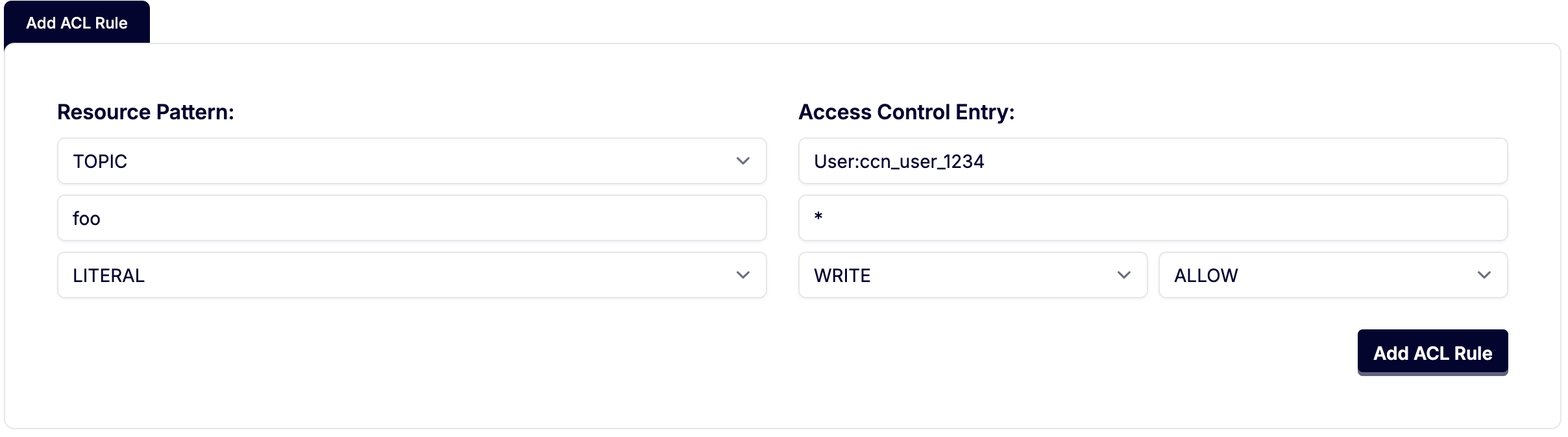
4. Click "Add ACL Rule"
5. Fill in the rule information. In this example we are creating a `TOPIC` ACL for topics that match the name `foo` exactly for the User `ccn_user_1234` and allowing that user to `WRITE` to the topic.
For information on ACL resource types and operations see the [Confluent Operation Documentation](https://docs.confluent.io/platform/current/security/authorization/acls/overview.html#operations).
## Managing ACLs via Kafka API
To manage ACLs via the Kafka API, use the Kafka Admin API with appropriate Kafka credentials.
## Managing ACLs via HTTP API
You can create, list, and delete ACLs using the WarpStream HTTP API. See the [ACLs API Reference](/warpstream/reference/api-reference/acls.md) for full endpoint documentation.
## Managing ACLs via Terraform
ACLs can be managed using the [WarpStream Terraform provider](https://registry.terraform.io/providers/warpstreamlabs/warpstream/latest/docs/resources/acl).
### Create an ACL
To create an ACL, use the `createAcls` method with the required ACL details:
```go
_, err = admin.CreateACLs(
context.Background(),
kafka.ACLBindings{{
Type: kafka.ResourceTopic,
Name: "topic_name",
ResourcePatternType: kafka.ResourcePatternTypeLiteral,
// See above the above ACL Principal section for information.
Principal: "User:",
Host: "*", // Request can come from any host.
Operation: kafka.ACLOperationWrite,
PermissionType: kafka.ACLPermissionTypeAllow,
}},
)
if err != nil {
fmt.Printf("Failed to create ACLs: %s\n", err.Error())
os.Exit(1)
}
```
### Delete an ACL
To delete an ACL, use the `deleteAcls` method with a filter matching the ACL you wish to remove:
```go
_, err = admin.DeleteACLs(
context.Background(),
kafka.ACLBindingFilters{{
Type: kafka.ResourceTopic,
Name: "topic_name",
ResourcePatternType: kafka.ResourcePatternTypeLiteral,
// See above the above ACL Principal section for information.
Principal: "User:",
Host: "*",
Operation: kafka.ACLOperationWrite,
PermissionType: kafka.ACLPermissionTypeAllow,
}},
)
if err != nil {
fmt.Printf("Failed to delete ACLs: %s\n", err)
os.Exit(1)
}
```
The examples above use the `librdkafka` package from Go. You can also try the `bin/kafka-acls.sh` script from Apache Kafka®'s official binary release for more hands-on experience:
```
bin/kafka-acls.sh --bootstrap-server localhost:9092 --remove --allow-principal User: --allow-principal User:Alice --allow-host 198.51.100.0 --allow-host 198.51.100.1 --operation Read --operation Write --topic Test-topic
```
```
bin/kafka-acls.sh --bootstrap-server localhost:9092 --add --allow-principal User:Bob --allow-principal User: --allow-host 198.51.100.0 --allow-host 198.51.100.1 --operation Read --operation Write --topic Test-topic
```
#### Using the `ANY` Resource Type in ACLs
Our system supports creating ACLs with the resource type `ANY` through the console, API, and [Terraform](https://registry.terraform.io/providers/warpstreamlabs/warpstream/latest/docs/resources/acl). This differs from standard Apache Kafka, where clients typically cannot create ACLs with resource type `ANY` and may reject them.
{% hint style="warning" %}
**Warning**
Using the `ANY` resource type is **not recommended**. It grants permissions across all resources of that type, broadening the attack surface, and can cause compatibility issues with standard Kafka clients, which expect ACLs for specific resource types. Whenever possible, use particular resource types to ensure stricter access control and interoperability.
{% endhint %}
## Denied Authorization Logs
Logs for denied authorizations are enabled by default and can be enable/disabled by setting the `-enableACLLogs` flag or `WARPSTREAM_ENABLE_ACL_LOGS` environment variable to `true` or `false` on the Agents.
Any actions that are denied due to a missing ACL or an explicit `DENY` ACL will show up in these logs. An example log is below:
{% code overflow="wrap" %}
```json
{"time":"2025-03-13T13:02:05.176353-05:00","level":"WARN","msg":"ACL Denied Operation on resource","principal":"User:ccun_9c5d...","operation":"CREATE","host":"127.0.0.1:56216","resource_type":"TOPIC","resource_name":"foo"}
```
{% endcode %}
In the example above we can see the user `User:ccun_9c5d...` tried to `CREATE` a `TOPIC` called `foo` and was denied.
---
# Agent Instructions
This documentation is published with GitBook. GitBook is the documentation platform designed so that both humans and AI agents can read, navigate, and reason over technical content effectively. Learn more at gitbook.com.
## Querying This Documentation
If you need additional information that is not directly available in this page, you can query the documentation by asking a question.
Perform an HTTP GET request on the following URL with the `ask` and `goal` query parameters:
```
GET https://docs.warpstream.com/warpstream/kafka/manage-security/configure-acls.md?ask=&goal=
```
`ask` is the immediate question: it should be specific, self-contained, and written in natural language.
`goal` is what the user is ultimately trying to achieve, the reason they need the answer. Sharing it helps GitBook give you a better, more relevant answer. A goal is most helpful when it describes the outcome the user wants rather than restating the question. For example, with `ask=how do I create an API token`, a goal like `automate deployments from our CI pipeline` lets GitBook tailor the answer to that use case.
The response will contain a direct answer to the question and relevant excerpts and sources from the documentation.
Use this mechanism when the answer is not explicitly present in the current page, you need clarification or additional context, or you want to retrieve related documentation sections.