
> For the complete documentation index, see [llms.txt](https://docs.warpstream.com/warpstream/llms.txt). Markdown versions of documentation pages are available by appending `.md` to page URLs; this page is available as [Markdown](https://docs.warpstream.com/warpstream/agent-setup/infrastructure-as-code/protecting-important-resources-from-accidental-deletion.md).

# Protecting important resources from accidental deletion

## Soft deletion

By default, when you delete a Virtual Cluster or a topic, Warpstream does not delete the associated data. The data is retained and you can restore the Virtual Cluster or topic.

Warpstream offers two levels of protection against accidental deletion for both Virtual Clusters and topics. First, both Virtual Clusters and topics are soft-deleted by default. Second, WarpStream offers deletion protection, which protects resources from being deleted.

### Restoring a Virtual Cluster

When you delete a virtual cluster, either through the API or through the console, it will appear in the "Recently Deleted Clusters" section on the [Virtual clusters page](https://console.warpstream.com/virtual_clusters).

It will stay there for **30 days** before WarpStream deletes the data associated with it.

You can restore the cluster at any time by clicking the `Restore Cluster` button.

<figure><img src="/files/HYLrrhgtr7XfG7VEREmG" alt=""><figcaption></figcaption></figure>

### Restoring a Topic

When you delete a topic from a Kafka client, the WarpStream API, or the console, you will no longer be able to produce to or consume from the topic. However, WarpStream will retain the data and allow you to restore the topic. Once a topic is restored, you will be able to resume producing and consuming. The default retention period for soft-deleted topics is 24 hours.

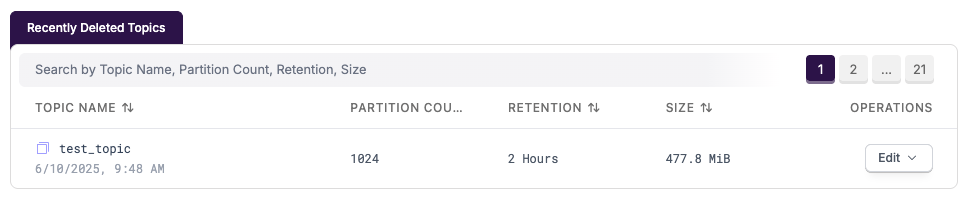
You can restore the topic by clicking `Edit > Restore Topic` in the "Recently Deleted Topics" view in the WarpStream Console.

<figure><img src="/files/Kk9k1gRVJOYL5jHrTTgI" alt=""><figcaption></figcaption></figure>

It is also possible to restore it by using the `api/v1/undelete_topic` API.

To configure how WarpStream interacts with topic deletion with these parameters, please use your usual Kafka client to set these cluster-level parameters (in Kafka terminology, these are broker-level configurations):

<table data-full-width="true"><thead><tr><th width="403.91015625">configuration parameter</th><th></th></tr></thead><tbody><tr><td><code>warpstream.soft.delete.topic.enable</code></td><td><p>if <code>true</code>, topic deletion will be a soft deletion, and it will be possible to restore the topics.</p><p>If <code>false</code>, deleting a topic will cause the immediate deletion of all of the associated data, with no way to recover it.<br><br>Defaults to <code>true</code>.</p></td></tr><tr><td><code>warpstream.soft.delete.topic.ttl.hours</code></td><td>If <code>warpstream.soft.delete.topic.enable</code> is true, a deleted topic's data will be kept for this many hours before being irrecoverably deleted.<br><br>Defaults to <code>24</code>.</td></tr></tbody></table>

## Deletion protection

Virtual Clusters and topics in WarpStream can be protected from deletion. When deletion protection is enabled, you will be unable to delete resources until deletion protection is turned off. This prevents accidental destructive operations, which can occur when using infrastructure-as-code tools.

### Through terraform

To set the deletion protection flag using Terraform, please refer to our Terraform provider documentation for [Virtual Clusters](https://registry.terraform.io/providers/warpstreamlabs/warpstream/2.1.2/docs/resources/virtual_cluster) and for [Topics](https://registry.terraform.io/providers/warpstreamlabs/warpstream/latest/docs/resources/topic).

Enabling deletion protection will look like this for virtual clusters:

```hcl
resource "warpstream_virtual_cluster" "test_configuration" {
  name = "vcn_test_configuration"
  tier = "pro"
  configuration = {
    enable_deletion_protection = true
  }
}
```

And like this for topics:

```hcl
resource "warpstream_topic" "topic" {
  topic_name         = "logs"
  partition_count    = 1
  virtual_cluster_id = warpstream_virtual_cluster.test.id
  enable_deletion_protection = true
}
```

### Through the API

* To set the deletion protection flag on a Virtual Cluster, use the [UpdateConfiguration](/warpstream/reference/api-reference/virtual-clusters/updateconfiguration.md) API.
* To set the deletion protection flag on a topic, set the topic-level configuration `warpstream.deletion.protection.enabled` to `true`.


---

# Agent Instructions
This documentation is published with GitBook. GitBook is the documentation platform designed so that both humans and AI agents can read, navigate, and reason over technical content effectively. Learn more at gitbook.com.

## Querying This Documentation
If you need additional information that is not directly available in this page, you can query the documentation dynamically by asking a question.

Perform an HTTP GET request on the current page URL with the `ask` query parameter, and the optional `goal` query parameter:

```
GET https://docs.warpstream.com/warpstream/agent-setup/infrastructure-as-code/protecting-important-resources-from-accidental-deletion.md?ask=<question>&goal=<endgoal>
```

`ask` is the immediate question: it should be specific, self-contained, and written in natural language.
`goal` is optional and describes the broader end goal you are ultimately trying to accomplish on behalf of the user. GitBook uses it to tailor the answer towards what is most useful for that goal.

The response will contain a direct answer to the question and relevant excerpts and sources from the documentation.

Use this mechanism when the answer is not explicitly present in the current page, you need clarification or additional context, or you want to retrieve related documentation sections.
